
Built for the PC gamer who isn't switching to Linux. You like that Windows runs your games, anticheat and all. You've got Game Pass, an Xbox library, Epic exclusives, maybe PSN, and the launcher chaos that comes with all of them.
What you don't have is a controller-first interface that pulls it all into one place.
Every game, every storefront, every emulator.
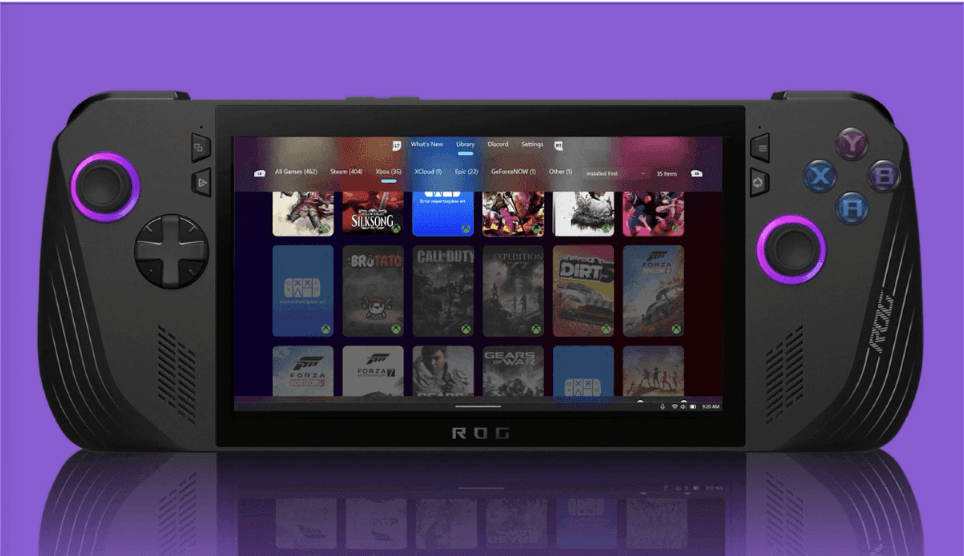
Sign in once. Winhanced pulls your Steam, Xbox, Epic, GOG, PlayStation, Game Pass, xCloud, and GeForce Now catalogs into one library, alongside any emulator you have installed.
Sleep and resume that actually work.
Modern Standby on Windows handhelds is famously broken. Battery drains overnight, games crash on wake. We rewrote the sleep path so neither happens.
The hardware tunes itself, game by game.
Autopilot dials in wattage per game on handhelds. Smart Profiles are settings packages tuned by the community: pick one and Winhanced applies it to both the game and the device. Per-game profiles save your own tweaks. Quick Resume holds multiple games suspended at once.
Library
Every game you own. Every emulator you have. In one place.
Steam, Xbox, Epic, GOG, PlayStation, Game Pass, xCloud, GeForce Now. Plus any emulator you have installed (RetroArch, Dolphin, PCSX2, whatever you've got). Sign in once and everything you own lands in one library, sorted however you actually think about your backlog.
App Library
Add anything Winhanced couldn't find on its own.
An emulator that didn't auto-detect, a game in some folder we can't see, a launcher we don't support yet, your browser, your music app. Point Winhanced at any .exe or shortcut and it gets a tile in your library, ready to launch with a controller.
xCloud and GeForce Now
Cloud games launch like local ones.
xCloud and GeForce Now stream right inside Winhanced. Click a cloud title and you're playing a couple of seconds later. No Edge tab, no controller-mapping hacks, no window losing focus halfway through a level.
Sleep and Resume
Close the lid mid-fight. Open it tomorrow.
Modern Standby is famously broken on Windows handhelds. Battery drains overnight, games crash on wake, controllers pair to nothing. We rebuilt the sleep path so it works like a console. Battery drain drops up to 80%, and your session, save, headphones, and controller all come back on wake.
Winhanced HUD
Controls without alt-tabbing, without an overlay.
The Winhanced HUD is a native Xbox Game Bar widget, not a third-party overlay. It doesn't trigger anticheat, doesn't tank framerate, and works in every game Game Bar does. One button mid-game gets you TDP, frame cap, resolution scale, and your Lossless Scaling controls.
What people are saying
"This is by far the best current launcher for PC gaming handhelds. Super well done."
Daniel Rubino, Editor-in-Chief, Windows Central"Winhanced makes your Windows handheld feel like, well, a handheld."
Jacob Roach, XDA Developers"Winhanced is rapidly becoming a very promising frontend for handheld gaming on Windows."
Adam Harrison, Windows Central"I own precious little Steam games. The thing I like about this project is it is standalone and works with every app while taking the best of every app for any handheld."
noxou, Discord community"An exciting project from a couple of plucky Windows 11 handheld users who want to improve the frustrating user experience."
Pocket Tactics"Thanks to the recent launch of Living Glass UI, Winhanced is starting to really take shape and feel like a serious alternative."
Adam Harrison, Windows Central"You can already see how Winhanced is trying to achieve that same experience as the Steam Deck's controller-focused interface."
Jacob Roach, XDA Developers"If the minds behind Winhanced have their way, this could all change."
Connor Christie, Pocket Tactics"This is by far the best current launcher for PC gaming handhelds. Super well done."
Daniel Rubino, Editor-in-Chief, Windows Central"Winhanced makes your Windows handheld feel like, well, a handheld."
Jacob Roach, XDA Developers"Winhanced is rapidly becoming a very promising frontend for handheld gaming on Windows."
Adam Harrison, Windows Central"I own precious little Steam games. The thing I like about this project is it is standalone and works with every app while taking the best of every app for any handheld."
noxou, Discord community"An exciting project from a couple of plucky Windows 11 handheld users who want to improve the frustrating user experience."
Pocket Tactics"Thanks to the recent launch of Living Glass UI, Winhanced is starting to really take shape and feel like a serious alternative."
Adam Harrison, Windows Central"You can already see how Winhanced is trying to achieve that same experience as the Steam Deck's controller-focused interface."
Jacob Roach, XDA Developers"If the minds behind Winhanced have their way, this could all change."
Connor Christie, Pocket TacticsWe built the frontend we wanted to use.
Floop designs Winhanced and builds the WinUI 3 app. 0degreez runs infrastructure and performance. No OEM, no VCs, no device to sell you. Winhanced is free; Patreon funds development, and backers get Early Access ahead of public builds.